$Id: ts.html,v 1.21 2026-09-03 19:32:29+09 kabe Exp $
dnf in i586 jail
Symptom: When building ibus package, %check fails:
make[5]: Entering directory '/home/kabe/r10builds/ibus-r10/BUILD/ibus-1.5.31/bindings/pygobject'
../../test-driver: line 112: 3034069 Segmentation fault (core dumped) "$@" >> "$log_file" 2>&1
FAIL: test-override-ibus.py
====================================================
   ibus 1.5.31: bindings/pygobject/test-suite.log
====================================================

# TOTAL: 1
# PASS:  0
# SKIP:  0
# XFAIL: 0
# FAIL:  1
# XPASS: 0
# ERROR: 0

.. contents:: :depth: 2

FAIL: test-override-ibus.py
Tracing it by gdb reveals that strlen(0xffffff) is called:
Core was generated by `python3 -B ./test-override-ibus.py'.

(gdb) where
#0  __GI_strlen () at ../sysdeps/i386/i586/strlen.S:63
#1  0xf7aca1fa in PyUnicode_FromString () at /lib/libpython3.12.so.1.0
#2  0xf6ff1f63 in pygi_marshal_to_py_basic_type.isra ()
    at /usr/lib/python3.12/site-packages/gi/_gi.cpython-312-i386-linux-gnu.so
#3  0xf6fdb7f1 in _wrap_g_field_info_get_value ()
    at /usr/lib/python3.12/site-packages/gi/_gi.cpython-312-i386-linux-gnu.so
#4  0xf7b03993 in cfunction_call () at /lib/libpython3.12.so.1.0

(gdb) info r
eax            0xffffff            16777215
Cause: You need to install 32bit version of /usr/bin/g-ir-compiler, /usr/bin/g-ir-generate, /usr/bin/g-ir-inspect . x86_64 version of these does not generate proper gobject-introspection for 32bit target.
Resolution: Install gobject-introspection-devel.i586.rpm package. Note that plain rpm -ivh --force will not overwrite these when x86_64 version is already installed; you may have to manually rpm2cpio < gobject-introspection-devel-1.79.1-6.el10.v1.i586.rpm | cpio -di to extract the binaries, then copy it to /usr/bin/ .
Symptom: meson fails with:
checking size of mp_limb_t... 4
configure: error: Oops, mp_limb_t is 32 bits, but the assembler code
in this configuration expects 64 bits.
You appear to have set $CFLAGS, perhaps you also need to tell GMP the
intended ABI, see "ABI and ISA" in the manual.
and there is no such manual "ABI and ISA".
Workaround: pass
rpmbuild -D '_host i586-redhat-linux-gnu' .
Symptom:: Compiling openmpi results in missing config file:
+ /usr/bin/make -O -j4 V=1 VERBOSE=1 V=1
make[1]: Entering directory '/home/kabe/r10builds/openmpi-devel-r10/BUILD/openmpi-5.0.2'
CDPATH="${ZSH_VERSION+.}:" && cd . && /bin/sh '/home/kabe/r10builds/openmpi-devel-r10/BUILD/openmpi-5.0.2/config/missing' aclocal-1.16 -I config
sh: line 1: config/opal_get_version.sh: No such file or directory
sh: line 1: config/opal_get_version.sh: No such file or directory
sh: line 1: config/opal_get_version.sh: No such file or directory
...
Workaround: use rpmbuild --with autogen option
to regenerate config/opal_get_version.sh .
Symptom: openldap compile fails, even if the system openssl is version 3.2.2 .
checking for openssl/ssl.h... yes
configure: error: in `/home/kabe/r10builds/openldap-r10/BUILD/openldap-2.6.8/openldap-2.6.8':
configure: error: OpenSSL 1.1.1 or newer required
See `config.log' for more details
error: Bad exit status from /var/tmp/rpm-tmp.JC1Yk0 (%build)
13:54:26
RPM build errors:
    Bad exit status from /var/tmp/rpm-tmp.JC1Yk0 (%build)

[kabe@rocky10 openldap-r10]$ rpm -q openssl
openssl-3.2.2-16.el10.i586

[kabe@rocky10 openldap-r10]$ openssl version
OpenSSL 3.2.2 4 Jun 2024 (Library: OpenSSL 3.2.2 4 Jun 2024)
Cause: By examining config.log,
configure:18173: gcc -c -O2 -flto=auto -ffat-lto-objects -fexceptions -g -grecord-gcc-switches -pipe -Wall -Werror=format-security -Wp,-U_FORTIFY_SOURCE,-D_FORTIFY_SOURCE=3 -Wp,-D_GLIBCXX_ASSERTIONS -specs=/usr/lib/rpm/redhat/redhat-hardened-cc1 -fstack-protector-strong -specs=/usr/lib/rpm/redhat/redhat-annobin-cc1  -m32 -march=i586 -mtune=generic -fasynchronous-unwind-tables -fstack-clash-protection  -Wl,-z,relro -Wl,--as-needed  -Wl,-z,pack-relative-relocs -Wl,-z,now -specs=/usr/lib/rpm/redhat/redhat-hardened-ld -specs=/usr/lib/rpm/redhat/redhat-annobin-cc1  -Wl,--build-id=sha1 -specs=/usr/lib/rpm/redhat/redhat-package-notes  -Wl,--as-needed -DLDAP_CONNECTIONLESS -DOPENSSL_NO_MD2 -D_TIME_BITS=64 -D_FILE_OFFSET_BITS=64 -fcf-protection=none conftest.c >&5
configure:18173: $? = 0
configure:18173: result: yes
configure:18189: gcc -E -D_TIME_BITS=64 -D_FILE_OFFSET_BITS=64 -fcf-protection=none conftest.c
In file included from /usr/include/openssl/opensslconf.h:14,
                 from /usr/include/openssl/macros.h:14,
                 from /usr/include/openssl/opensslv.h:109,
                 from conftest.c:100:
/usr/include/openssl/configuration.h:42:10: fatal error: configuration-x86_64.h: No such file or directory
   42 | #include "configuration-x86_64.h"
      |          ^~~~~~~~~~~~~~~~~~~~~~~~
compilation terminated.
that is, -march=i586 -m32 is not passed down to cpp.
Workaround: Include -march=i586 -m32 in
CPPFLAGS, that is,
binary:
	uname -a > log
	LANG=C.utf-8 \
	CPPFLAGS="-D_TIME_BITS=64 -D_FILE_OFFSET_BITS=64 -fcf-protection=none -march=i586 -m32" \
	LDFLAGS="-Wl,-z,relro -Wl,--as-needed  -Wl,-z,pack-relative-relocs -Wl,-z,now -specs=/usr/lib/rpm/redhat/redhat-hardened-ld -specs=/usr/lib/rpm/redhat/redhat-annobin-cc1  -Wl,--build-id=sha1 -specs=/usr/lib/rpm/redhat/redhat-package-notes -m32" \
	./rpmbuild --target=i586 -v -bb --noclean \
	-D 'dist $(DIST)' \
	--with servers \
	SPECS/$(PKG).spec 2>&1 | \
	while IFS="" read line; do echo `date '+%Y-%m-%d %T'` "$$line"; done | \
	tee -a log
dnf in i586 jailSymptom: In /chroot/i586 jail, dnf command refuses to run as non-root normal user. It works on base OS.
[kabe@i586 ~]$ dnf --disablerepo=\* --enablerepo=ix86\* list
Rocky Linux 10 - ix86repo-BaseOS                1.7 MB/s | 274 kB     00:00
Rocky Linux 10 - ix86repo-AppStream             3.3 MB/s | 491 kB     00:00
Rocky Linux 10 - ix86repo-CRB                   308 kB/s |  40 kB     00:00
Rocky Linux 10 - ix86repo-devel                 277 kB/s |  18 kB     00:00
Rocky Linux 10 - ix86repo-epel                  369 kB/s |  51 kB     00:00
Error: SQLite error on "/var/lib/dnf/history.sqlite": Executing an SQL statement failed: attempt to write a readonly database
[kabe@i586 ~]$ ls -l /var/lib/dnf
total 4132
-rw-r--r-- 1 root root  118784 Dec 29 12:12 history.sqlite
-rw-r--r-- 1 root root   32768 Dec 29 12:12 history.sqlite-shm
-rw-r--r-- 1 root root 4078832 Dec 29 12:12 history.sqlite-wal
Workaround: Copy the /etc/resolv.conf of the
base system into the i586 jail.
The error message is sure more than confusing.
Symptom: rust-libc package from EPEL fails in %install stage:
2026-03-29 02:17:28 + /usr/bin/env CARGO_HOME=.cargo 'RUSTFLAGS=-Copt-level=3 -Cdebuginfo=2 -Ccodegen-units=1 -Cstrip=none -Clink-arg=-specs=/usr/lib/rpm/redhat/redhat-package-notes' /usr/bin/cargo install -j4 --profile rpm --no-track --path .
2026-03-29 02:17:28 error: no packages found with binaries or examples
2026-03-29 02:17:28 error: Bad exit status from /var/tmp/rpm-tmp.CfLSqs (%install)
2026-03-29 02:17:28
Cause: The %cargo_install rpmbuild definition,
defined in /usr/lib/rpm/macros.d/macros.rust-toolset,
which is provided by rust-toolset-1.88.0-1.el10.v1.noarch
(artifact from rust-1.88.0 compilation)
is old.
You must use definition from
/usr/lib/rpm/macros.d/macros.cargo
(provided by cargo-rpm-macros-26.3-1.el10_0.noarch, from EPEL)
.
You have been warned about conflict when installing
cargo-rpm-macros.noarch package.
Workaround: Uninstall rust-toolset.noarch package.
Symptom: When entering nonexistent command, shell pauses for long time and shows nonexistent i386 package mirror.
[kabe@rocky10i686 ~]$ aa
bash: aa: command not found...
<Long Pause>
Failed to search for file: cannot update repo 'extras': Cannot prepare internal mirrorlist: Status code: 404 for https://mirrors.rockylinux.org/mirrorlist?arch=i386&repo=extras-10 (IP: 146.75.42.132); Last error: Status code: 404 for https://mirrors.rockylinux.org/mirrorlist?arch=i386&repo=extras-10 (IP: 146.75.42.132)
[kabe@rocky10i686 ~]$ _
Resolution: Uninstall PackageKit-command-not-found packages.
The hook is defined in /etc/profile.d/PackageKit.sh .
If your target machine cannot start Wayland, Xorg is the option.
Install plasma-workspace-x11 (it pulls ing Xorg too)
and xorg-x11-xinit for /usr/bin/startx .
You may also need xterm for testing out.
After install, be sure to iron out problems unrelated to KDE Plasma,
by invoking xinit -- /usr/bin/Xorg :0 vt1 -retro
and checking that Xorg works on its own.
After that, plain LANG=ja_JP.utf-8 startx
should start KDE Plasma desktop in Xorg.
Symptom: Various tips say to set "IBus Wayland" in System Settings - Keyboard - Virtual Keyboard, but there is no such selection; only "None" and "Maliit".
Resolution: Install
ibus-panel (in CRB repository) and
ibus-wayland package.
This seems to be a bug in EPEL packaging.
$ sudo dnf --enablerepo=crb install ibus-panel ibus-waylandThis will make "IBus Wayland" available, and properly starts
ibus-daemon with --panel disable
when "IBus Wayland" is selected for Virtual Keyboard.
For initial setup of ibus, invoke ibus-setup from
krunner (Alt-F2) or konsole.
Invocation is done from /usr/share/applications/org.freedesktop.IBus.Panel.Wayland.Gtk3.desktop .
[Desktop Entry]
# IBus Wayland is a branding name but not translatable.
Name=IBus Wayland
Exec=/usr/libexec/ibus-ui-gtk3 --enable-wayland-im --exec-daemon --daemon-args "--xim --panel disable"
Type=Application
X-KDE-Wayland-VirtualKeyboard=true
Icon=ibus
NoDisplay=true
X-Desktop-File-Install-Version=0.26
Change this file, if additional ibus-daemon options are needed, such as
--timeout=120000 for slow machines.
Symptom: Alt-F2 (krunner) only shows square window. Running krunner from terminal says
kf.plasma.quick: "qrc:/krunner/RunCommand.qml"
 "Error loading QML file.\n16: module \"org.kde.milou\"
 is not installed\n"
Cause: plasma-milou package is not installed.
Resolution: Install plasma-milou package.
Symptom: In Hyper-V guest, Xorg does not start by
xinit -- /usr/bin/Xorg :0 -retro vt1 :
[ 49349.271]
X.Org X Server 1.21.1.18
X Protocol Version 11, Revision 0
[ 49349.272] Current Operating System: Linux rocky10i686.five.ten 6.12.0-124.35.1.el10_1.v1.i586 #1 SMP Thu May 21 22:56:01 JST 2026 i686
[ 49349.272] Kernel command line: BOOT_IMAGE=(hd0,msdos1)/vmlinuz-6.12.0-124.35.1.el10_1.v1.i586 root=UUID=40f5df2c-4f37-4567-a480-b03b9fe92790 ro resume=UUID=99a9ca85-8033-4311-a5fb-fc0b9ad8f8c8 video=800x600
[ 49349.273] Build ID: xorg-x11-server 21.1.18-2.fc43
[ 49349.273] Current version of pixman: 0.43.4
[ 49349.274]    Before reporting problems, check http://wiki.x.org
        to make sure that you have the latest version.
[ 49349.274] Markers: (--) probed, (**) from config file, (==) default setting,
        (++) from command line, (!!) notice, (II) informational,
        (WW) warning, (EE) error, (NI) not implemented, (??) unknown.
[ 49349.274] (==) Log file: "/var/log/Xorg.0.log", Time: Sat May 23 16:34:47 2026
[ 49349.275] (==) Using config directory: "/etc/X11/xorg.conf.d"
[ 49349.275] (==) Using system config directory "/usr/share/X11/xorg.conf.d"
[ 49349.275] (==) No Layout section.  Using the first Screen section.
[ 49349.275] (==) No screen section available. Using defaults.
[ 49349.275] (**) |-->Screen "Default Screen Section" (0)
[ 49349.275] (**) |   |-->Monitor "<default monitor>"
[ 49349.275] (==) No monitor specified for screen "Default Screen Section".
        Using a default monitor configuration.
[ 49349.275] (**) Allowing byte-swapped clients
[ 49349.275] (==) Automatically adding devices
[ 49349.275] (==) Automatically enabling devices
[ 49349.275] (==) Automatically adding GPU devices
[ 49349.275] (==) Automatically binding GPU devices
[ 49349.275] (==) Max clients allowed: 256, resource mask: 0x1fffff
[ 49349.275] (==) FontPath set to:
        catalogue:/etc/X11/fontpath.d,
        built-ins
[ 49349.275] (==) ModulePath set to "/usr/lib/xorg/modules"
[ 49349.275] (II) The server relies on udev to provide the list of input devices.
        If no devices become available, reconfigure udev or disable AutoAddDevices.
[ 49349.275] (II) Module ABI versions:
[ 49349.275]    X.Org ANSI C Emulation: 0.4
[ 49349.275]    X.Org Video Driver: 25.2
[ 49349.275]    X.Org XInput driver : 24.4
[ 49349.275]    X.Org Server Extension : 10.0
[ 49349.276] (++) using VT number 1

[ 49349.276] (--) controlling tty is VT number 1, auto-enabling KeepTty
[ 49349.277] (II) systemd-logind: took control of session /org/freedesktop/login1/session/_31
[ 49349.278] (II) xfree86: Adding drm device (/dev/dri/card1)
[ 49349.278] (II) Platform probe for /sys/devices/LNXSYSTM:00/LNXSYBUS:00/PNP0A03:00/device:07/VMBUS:01/5620e0c7-8062-4dce-aeb7-520c7ef76171/drm/card1
[ 49349.279] (II) systemd-logind: got fd for /dev/dri/card1 226:1 fd 13 paused 0
[ 49349.279] (II) xfree86: Adding drm device (/dev/dri/card0)
[ 49349.279] (II) Platform probe for /sys/devices/platform/vgem/drm/card0
[ 49349.280] (II) systemd-logind: got fd for /dev/dri/card0 226:0 fd 14 paused 0
[ 49349.282] (--) PCI:*(0@0:8:0) 1414:5353:0000:0000 rev 0, Mem @ 0xf8000000/67108864, BIOS @ 0x????????/131072
[ 49349.282] (II) LoadModule: "glx"
[ 49349.282] (II) Loading /usr/lib/xorg/modules/extensions/libglx.so
[ 49349.284] (II) Module glx: vendor="X.Org Foundation"
[ 49349.284]    compiled for 1.21.1.18, module version = 1.0.0
[ 49349.284]    ABI class: X.Org Server Extension, version 10.0
[ 49349.284] (==) Matched modesetting as autoconfigured driver 0
[ 49349.284] (==) Matched fbdev as autoconfigured driver 1
[ 49349.284] (==) Matched vesa as autoconfigured driver 2
[ 49349.284] (==) Assigned the driver to the xf86ConfigLayout
[ 49349.284] (II) LoadModule: "modesetting"
[ 49349.284] (II) Loading /usr/lib/xorg/modules/drivers/modesetting_drv.so
[ 49349.284] (II) Module modesetting: vendor="X.Org Foundation"
[ 49349.284]    compiled for 1.21.1.18, module version = 1.21.1
[ 49349.284]    Module class: X.Org Video Driver
[ 49349.284]    ABI class: X.Org Video Driver, version 25.2
[ 49349.284] (II) LoadModule: "fbdev"
[ 49349.284] (WW) Warning, couldn't open module fbdev
[ 49349.284] (EE) Failed to load module "fbdev" (module does not exist, 0)
[ 49349.284] (II) LoadModule: "vesa"
[ 49349.284] (WW) Warning, couldn't open module vesa
[ 49349.284] (EE) Failed to load module "vesa" (module does not exist, 0)
[ 49349.284] (II) modesetting: Driver for Modesetting Kernel Drivers: kms
[ 49349.284] (WW) Falling back to old probe method for modesetting
[ 49349.284] (II) modeset(G0): using drv /dev/dri/card1
[ 49349.284] (EE) Screen 0 deleted because of no matching config section.
[ 49349.284] (II) UnloadModule: "modesetting"
[ 49349.284] (EE) Device(s) detected, but none match those in the config file.
[ 49349.284] (EE)
Fatal server error:
[ 49349.284] (EE) no screens found(EE)
[ 49349.284] (EE)
Please consult the The X.Org Foundation support
         at http://wiki.x.org
 for help.
[ 49349.284] (EE) Please also check the log file at "/var/log/Xorg.0.log" for additional information.
[ 49349.284] (EE)
[ 49349.286] (EE) Server terminated with error (1). Closing log file.
Workaround: Prepare /etc/X11/xorg.conf.d/10-hyperv-modeset.conf as:
Section "Device"
    Identifier  "HyperV-KMS"
    Driver      "modesetting"
    Option      "kmsdev" "/dev/dri/card1"
    ##BusID       "VMBUS:01"
    ##Option      "PrimaryHeads" "1"
    ##Option      "Primarys" "1"
EndSection
Symptom: Xorg resets resolution to 1024x768; I want to keep it to 800x600.
Workaround: Prepare /etc/X11/xorg.conf.d/40-monitor800.conf :
# /etc/X11/xorg.conf.d/40-monitor800.conf
Section "Monitor"
        Identifier "Monitor800x600"
        Modeline "m800x600"   40.00  800 840 968 1056  600 601 605 628 +hsync +vsync
        Option "PreferredMode" "m800x600"
EndSection

Section "Screen"
        Identifier "Screen800x600"
        Monitor "Monitor800x600"
EndSection
Symptom Running on an i586, which involves SSE emulation. It seems to SIGSEGV on otherwise harmless places. It works on SSE2-enabled processor.
(gdb) disas /r
...
   0xb23fba25 <+693>:   e8 66 00 00 00          call   0xb23fba90 <cpuinfo_x86_detect_isa>
   0xb23fba2a <+698>:   f3 0f 6f 85 08 ff ff ff movdqu -0xf8(%ebp),%xmm0
   0xb23fba32 <+706>:   83 c4 3c                add    $0x3c,%esp
   0xb23fba35 <+709>:   0f 29 86 d0 01 0a 00    movaps %xmm0,0xa01d0(%esi)
   0xb23fba3c <+716>:   f3 0f 6f 85 18 ff ff ff movdqu -0xe8(%ebp),%xmm0
   0xb23fba44 <+724>:   0f 29 86 e0 01 0a 00    movaps %xmm0,0xa01e0(%esi)
   0xb23fba4b <+731>:   f3 0f 6f 85 28 ff ff ff movdqu -0xd8(%ebp),%xmm0
=> 0xb23fba53 <+739>:   0f 29 86 f0 01 0a 00    movaps %xmm0,0xa01f0(%esi)
   0xb23fba5a <+746>:   f3 0f 6f 85 38 ff ff ff movdqu -0xc8(%ebp),%xmm0
   0xb23fba62 <+754>:   0f 29 86 00 02 0a 00    movaps %xmm0,0xa0200(%esi)
   0xb23fba69 <+761>:   f3 0f 6f 85 48 ff ff ff movdqu -0xb8(%ebp),%xmm0
   0xb23fba71 <+769>:   0f 29 86 10 02 0a 00    movaps %xmm0,0xa0210(%esi)
(gdb) print /x 0xa01f0+$esi
$1 = 0xb7e8a000 straddles new page
Cause: Since SSE emulation code is running inside
#UD exception handler, it is in an atomic context and cannot
page-in additional accessed memory, which involves sleep.
It will likely give SIGSEGV on things such as
movaps %xmm0, (faraway-memory).
Workaround: Modify the source code so that
the program does not uses movaps, movupd and friends.
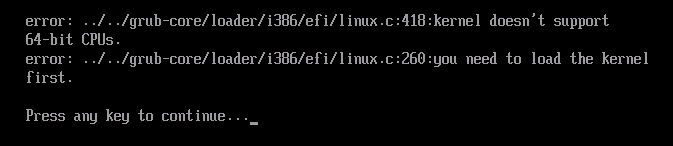
Answer: No. You cannot boot 32bit kernel from 64bit UEFI. You must reconfigure the machine to legacy boot mode.
Although it is possible to boot to grub2 menu by preparing BOOTX64.EFI, grub2 in 64bit mode refuses to load the 32bit kernel:
You may be able to boot from 32bit UEFI, but I do not have hands on such arcane machine (older x86 Macintosh is example of such machine) .
Resolution: Put following in /boot/grub2/grub.cfg :
serial --unit=0 --speed=9600
terminal_output serial
terminal_input serial
Some documents says to terminal serial;
you need to to switch to terminal_output in
GRUB2 2.12.
serial --unit=0 denotes /dev/ttyS0 .
USB serial converters are not supported other then
Prolific PL2303 (vendor=0x067b, product=0x2303).
When entering commands above from the VGA console,
it freezes on first terminal_*,
so you must run in batch.
Delete contents of the existing menu, enter above,
then Ctrl+X to run it.
Resolution: Install
pcmciautils package,
and issue sudo pccardctl eject 0 .
問題: Wayland ではなく Xorg の KDE セッションで日本語入力できない
回避方法: RHEL 10 はいろいろとWayland化されているので、Xorgのセッションに やさしくありません。
~/.bashrc に以下を書き加える
(自動でやるにはかなり面倒な上、Waylandとの共存が難しい)
## x11 ibus settings
export XMODIFIERS=@im=ibus
export GTK_IM_MODULES=ibus
export QT_IM_MODULES=ibus
export QT_IM_MODULE=ibus
ibus-daemon -r -d --xim --timeout=120000
と入力し、ibus daemonを手動起動する。
(自動で起動させるにはかなり手間がかかる)